Last updated: October 20, 2026.
For nonprofits, keeping solid books is more important than ever. Not only is it good from a nonprofit governance perspective, It's also important to know where your money is going in today's hyper-competitive funding environment. But tracking expenses and donations, producing reports for tax purposes, and getting a clear view of payments made by your organization can be a daunting task — especially when you're focused on your mission.
An accounting package like QuickBooks Online can help you make sense of it all, but you'll want to choose the version that's right for your specific needs. Currently, TechSoup offers two online editions of this tool: QuickBooks Online Advanced and QuickBooks Online Plus. Both are available as annual subscriptions at a discount for eligible organizations. Let's take a moment to compare some features and determine which one might be best for your nonprofit.

QuickBooks Online Plus
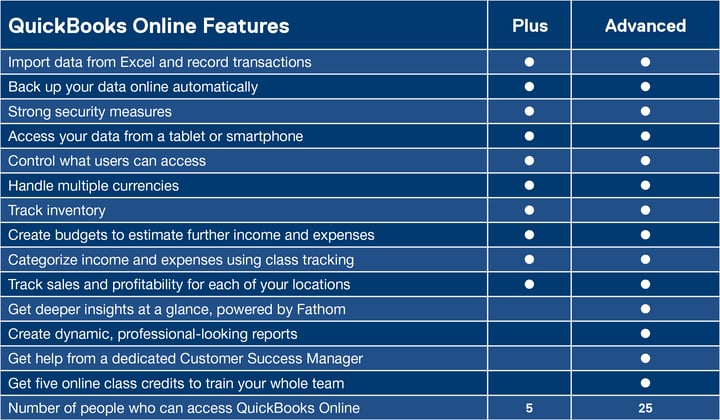
This software is great for small organizations that don't need to give access to more than five users. It has a solid set of accounting tools that should cover the basic (and not-so-basic) accounting needs of most organizations. At a glance, QuickBooks Online Plus allows you to
- Create a chart of accounts that categorizes and views expenses in line with IRS Form 990
- Draft reports showing contributions by grants and individual donors
- Plan budgets based on fundraising and expense data
- Use business planning and analysis tools, like the Statement of Financial Income & Expense
- Organize critical financial information while allowing an accountant to work on the software simultaneously
Check our product page for a closer look at the benefits and capabilities of using QuickBooks Online Plus at your nonprofit.
QuickBooks Online Advanced
Larger organizations with more complex accounting needs may want to look into QuickBooks Online Advanced. This edition allows up to 25 users access to your accounts. It has all the functionality of QuickBooks Online Plus, but it is also powered with an additional set of tools that some nonprofits may require. These include
- Custom user permissions for all 25 accounts, so each user has the right amount of access to sensitive data.
- QuickBooks Priority Circle, Intuit's premium program, which includes a dedicated Customer Success Manager.
- Five credits for online training courses through quickbookstraining.com. Each credit gets you a different course. All courses are self-paced, and training videos can be watched as often as needed.
- Smart Reporting, powered by Fathom, available to new QuickBooks Online customers as an add-on. This tool allows you to import data into it from a QuickBooks Online chart of accounts containing up to 3,000 accounts. Additionally, you can benefit from enhanced reporting features. Build dashboards, create KPIs, and track both financial and nonfinancial aspects of your organization.
Again, take a look at our product page for further details on the benefits and capabilities of QuickBooks Online Advanced.
Side-by-Side Comparison of Features
Here's a handy chart to get a clearer picture of what each edition has to offer.
What AI Features Does QuickBooks Online Have?
Intuit Intelligence AI features are included in both QuickBooks Online Plus and QuickBooks Online Advanced. Both feature an AI chatbot that you can use to answer questions about your accounting data, plus AI features for reconciliation, tools that find anomalies and discrepancies, and more.
QuickBooks Online Advanced also includes features for tracking key performance indicators and building dashboards, among other things.
The Verdict
Both editions of QuickBooks Online offered through TechSoup are solid accounting solutions for your nonprofit. Aside from the additional tools you get with QuickBooks Online Advanced, the biggest difference between these two tools is the number of users allowed. Take a moment to review all the information above, and perhaps share this with your IT professional. A little bit of research can go a long way when it comes to choosing the best accounting software for your organization.
Additional Resources: QuickBooks Online
- Read how nonprofits in Chicago and Austin are using QuickBooks Online to benefit their communities.
- Check out the QuickBooks Online FAQ.
- See webinars on QuickBooks Online for new users and existing users.